Facebook / Meta - Viewthrough Integration

Rockerbox and Meta partnered to create an integration that allows Rockerbox to more accurately reflect Meta performance. With this integration, Rockerbox can deterministically attribute conversions to Meta not just for clicks, but also for views and engagements.
For DWH customers: due to privacy restrictions in our agreement with Meta, Meta view-through data is available only in aggregate reporting.
Requirements
- Sharing 'Purchase' events with Meta via CAPI and/or pixels.
- You must be passing some mutual identifier to both Rockerbox and Meta to leverage as a match key. The recommended match key is order_id.
- Order ID coverage across purchase events to Meta must remain above 80%.
- Meta order IDs map to DV order IDs at least 80%.
- You agree for Rockerbox to send a performance report of Meta touchpoints to Meta daily.
How the Integration Works
- Once advertisers opt-in to this integration, Meta sends Rockerbox an hourly, log-level feed of Meta events tied to each recognized conversion event in the past 28 days.
- Rockerbox ingests this log-level file and matches to advertiser conversion events using the identified match key (i.e. order ID) and will be inserted on the user's path to conversion touchpoint.
- These conversions will appear in the same 5-tiered reporting structure in Rockerbox.
How to Activate this Integration
- Access the integration page in your Rockerbox account and go through authorization steps for all Meta accounts you want to opt-in to this integration to maintain existing access to those Meta accounts with a new option for Advanced Meta Features:
- Navigate to Data -> Integrations
- Scroll down the page to your 'Connected Accounts' under Meta platform. Click on the arrows icon on the right to opt-in for and click ‘Grant consent’:
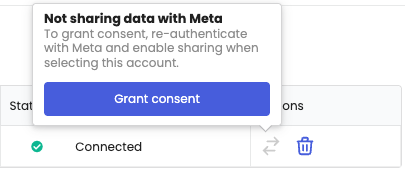
- Enter your credentials to re-authenticate
- There will be a new opt-in option for ‘Advanced Meta Features’ and you will need to consent there for each account.
- Go back to Data -> Integrations to confirm accounts that are opted-in via this new icon:
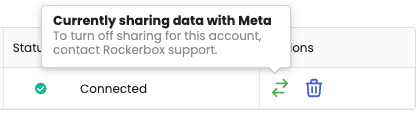
- Once submitted, Meta will start sharing view-through data with Rockerbox and Rockerbox will apply Meta view-through to your measurement.
- This activation will also enable Meta attribution passback including clicks and views.
Order ID Coverage Requirements
As this integration relies on sufficient match key coverage across Rockerbox and Meta, both parties will be tracking order ID coverage on a regular basis. If order ID coverage drops below requirements, you will be notified via alerts in the Rockerbox UI including the Meta account ID with the noted issue:
There are 2 alert types:
- Missing order IDs: Meta is not receiving order ID values for your purchase events sent to Meta via CAPI and/or pixel. Please review your Meta CAPI/pixel to ensure you are passing order ID values on all purchase events.
- Suggested actions:
- CAPI: Ensure order IDs are passed in the order_id field (Wiki)
- Meta Pixel:
- Shopify users: Order IDs are typically captured automatically
- Manual implementations: Order ID is not a default parameter and should be added as a custom property (e.g., "order_id": "123")
- Low match rate: Meta order ID format does not match the order ID format you are sharing with Rockerbox.
- Action: Review the order ID format shared with Meta and Rockerbox to validate that the same order ID formats are shared to both platforms. Please reach out to your Rockerbox representative.