DV Relay for Meta
Learn about DV Relay for Meta and how to enable it to unlock Meta's Custom Attribution.
What is it?
Rockerbox and Meta partnered to build an integration to share your event-level Meta attribution data back to Meta that will enable Custom Attribution in the Meta platform. Custom attribution is an attribution model that optimizes for outcomes as measured in your external analytics tool. For each conversion, you provide how much credit each Meta ad touchpoint deserves based on your attribution model. Instead of following Meta's default attribution model, the ad delivery system directly uses your attribution data to optimize toward the outcomes you measure. Meta still collects its own signal in real time and still runs its own auction, creative understanding and delivery optimization on Custom Attribution campaigns. Meta's models, creative-fatigue handling and learning speed are unchanged. Custom Attribution is an add-on to enable Meta to learn on more signal in addition to Meta's existing data.
DV Relay for Meta is the Rockerbox product to enable Attribution passback from Rockerbox to Meta.
Custom Attribution is the Meta optimization that leverages attribution data to drive campaign optimization.
- a Meta ad account
- a connected Meta dataset receiving Purchase events. Meta Events Manager blocks Custom Attribution Source creation without them
- track conversions using on-site pixels, Rockerbox's Shopify integration or Segment
What you get by enabling attribution passback?
- Sharper Meta optimization as Custom Attribution learns from your trusted attribution data over time.
- Optimization against your source of truth. Meta tunes delivery to the attribution model you already use for budgeting decisions, rather than to its own in-platform view.
- A cross-publisher signal. Your Rockerbox attribution accounts for touchpoints across every channel, so Meta learns from conversions your own model credits, not just the ones it can see.
How does it work?
1. Enable 'Advanced Meta Features' for each Meta account
- Open the Rockerbox integrations page.
- Scroll down to your Meta ‘Connected Accounts’ to view your Meta accounts.
- For accounts you want to enable, click on the ‘arrows’ icon under the ‘Actions’ column and click ‘Grant consent’ to kick off the Meta authorization process.
- Select the correct account and enable Advanced Meta Features for the Meta integration.
- Repeat for each Meta ad account you want covered.
- Confirm the activation status shown on the integrations page: the ‘arrows’ icon should now appear green for each activated account.
2. Rockerbox conversion settings for DV Relay for Meta
During the onboarding process advertisers will be asked to provide context into the below, which will inform the attribution context shared with Meta:
- Meta Pixel ID / Dataset ID used for your Purchase event
- Rockerbox conversion segment to use for attribution context
- Attribution Model: what Rockerbox attribution model is primarily used to make optimization decisions? For most customers, this will be Modeled Multi-Touch.
3. Attribution Uploads
Attribution context will be uploaded to Meta via an event called AppendAttribution (aka attribution passback). This will be provided only for conversions where Rockerbox has attributed a paid Meta click-based or view-based touchpoint for driving a conversion. If multiple Meta paid touchpoints are found on a user’s path to conversion, Rockerbox attribution context will be provided for all touchpoints.
Attribution data will be uploaded to Meta on a daily basis. This aligns with the cadence at which attribution data across your channels becomes available in the Rockerbox platform. Once uploaded, attribution data cannot be deleted or modified.
Notable event-level fields shared in attribution passback integration:
Attribution Context | Rockerbox Concept |
fbc | derived from fbclid passed on click-event URLs |
ad_id | fb_adid from your URL parameters |
touchpoint_type | touchpoint type to identify click or view-through events |
attribution_model | - modeled_multi-touch - last_touch - first_touch - even |
attribution_share | conversion credit for the given Meta touchpoint based on the selected attribution model |
attribution_value | revenue credit for the given Meta touchpoint based on the selected attribution model |
Confirm Custom Attribution is available
Verify the connection
Once activated, Rockerbox begins sending Custom Attribution data to Meta as AppendAttribution events, and creates the Custom Attribution Source that links your passback events to the dataset receiving your Purchase events. You do not need to create the source or approve a separate custom event yourself.
Meta emails the creator of the Custom Attribution Source when it is ready, and you can check the status at any time:
- Open Meta Events Manager and select Datasets from the left-hand menu.
- Choose the dataset receiving your Purchase events.
- Open the Custom attribution source attached to those events.
- Review the lifecycle widget and the Connection Quality page for connection status, active issues, and parameter coverage.
- Confirm the connection quality indicator shows High before you continue.
The lifecycle widget moves through Pending, In Training, Setup Complete, and Ready to Use. Ready to Use is the stage at which campaign creation unlocks — Setup Complete means training has finished but the product is not yet enabled for optimization.
Custom Attribution data in Events Manager
1. Advertisers must complete data-sharing setup in Rockerbox
2. After 48 hours, a new Events Manager experience will appear
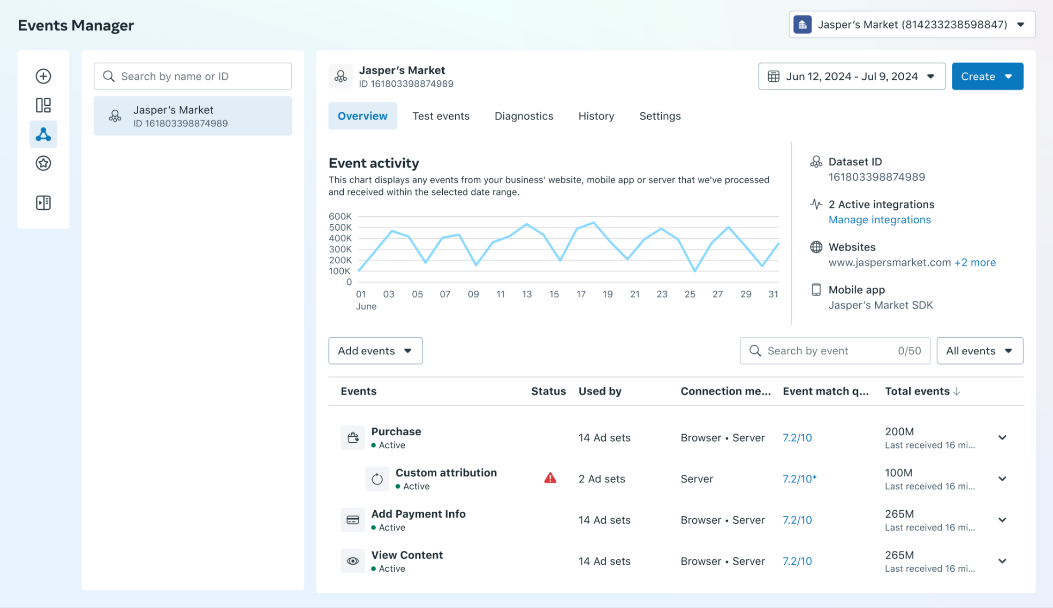
- Isolated Signal: The Custom Attribution signal is fully isolated for Custom Attribution campaigns. Behind the scenes, it is not even a "Purchase event."
- No EMQ Impact: This event does not impact EMQ and clients do not need to worry about deduplication with other Meta standard events.
- Data Quality Issues: If a data quality issue blocks campaign creation, it will be surfaced in Events Manager and Ads Manager. Rockerbox will work with Meta to resolve — plus programmatic access will automatically monitor data quality across all clients.
- Export Data: Clients can use the export data function to view the raw signal at the ad-set level that Rockerbox is sending. Note: this may differ from Rockerbox dashboards due to factors like data delays.
What to do next
Once your connection quality shows High and the source reads Ready to Use, Custom Attribution is available in Ads Manager. There are two ways forward, and you can do either first:
- Prove it before you commit. Run a two-week A/B test against a matched business-as-usual campaign, with creative and targeting held identical across both cells and no changes mid-flight. Your Rockerbox representative can share a more detailed testing playbook.
- Visit this Help Article for more information on how to set up a successful A/B test.
- Build with it directly. Configure a campaign to optimize against your Rockerbox attribution, using the Custom attribution model and your Custom Attribution source.
FAQs
Does this integration support view-through conversions?
Yes. Rockerbox passback covers ad impressions as well as ad clicks once Meta view-through integration is enabled. Currently, Meta Custom Attribution leverages click events only but aims to learn from new view events available via the view-through integration in the future.
Does this integration require view-through integration?
No, the Rockerbox attribution passback to Meta can be activated without activating the Meta view-through integration.
Will this integration interfere with my existing Meta CAPI provider?
No. You are safe to run this integration alongside any other Conversions API integration. The attribution events are unique to this integration and are sent as AppendAttribution events. They do not interfere with the standard conversion events you send through any other CAPI integration, and there is no risk of deduplication errors for your primary conversions.
Will this integration impact my existing campaigns or Meta performance?
Not immediately. Enabling the integration sends data to Meta to power Custom Attribution; it has no immediate effect on existing campaigns. Once Custom Attribution is live on your account, you choose which campaigns use that data for optimization.
How do I know the integration is configured correctly?
- Advanced Meta Features is enabled on the Rockerbox integrations page, for each ad account you want covered.
- Order IDs are being sent to Meta with your purchase events, in the same format you send to Rockerbox.
- You begin to see attribution events in Meta Events Manager named AppendAttribution.
- If Rockerbox was sending passback for your account before the move to the current event, you may see both AppendClickAttribution and AppendAttribution for a period. Rockerbox sends both in parallel until Meta confirms data continuity, then stops the legacy event.
Why do I see more attribution events than orders?
Where Rockerbox sends data for more than one attribution model, it sends one event per supported model for each order, each with a distinct event ID so the events are not deduplicated against one another.
How long before I can test this or use it on a campaign?
Plan for roughly a 14-day data collection window after enabling passback, measured from the first high-quality event Meta receives. Meta needs enough passed-back attribution data to learn from before it can meaningfully influence delivery. Testing before that window closes may produce unreliable results. A test itself then needs a two-week minimum flight, so plan for about four weeks from activation to a readable result.
Is there a minimum conversion volume?
Custom Attribution works best on accounts with consistent, meaningful daily volume of Meta-attributed conversions. Below sufficient volumes, there is not enough signal for the model to learn from and a two-week test is unlikely to reach a readable result.
Which attribution model should I send?
Your source-of-truth model – multi-touch, first-click, last-touch – whatever model you use drive decisioning internally should be used to drive this model training.
Custom Attribution works best when the signal you send differs from what Meta already uses. If your own model closely tracks Meta's reported results, there is less room for the model to improve delivery.
Is Custom Attribution available for non-Purchase events?
Currently, this model is built for purchase events specifically. We will update when Custom Attribution is available for other event types.
What if fractional attribution credit changes over time?
Attribution credit will be used directionally by Meta’s model for optimizations thus slight changes in credit over time will not impact Meta’s ability to leverage the data for optimizations.
Retroactive modifications to attribution credit can not be supported by the feature. This means Rockerbox does not send changes to Meta when attribution is updated after other data—such as Linear TV—is ingested days or weeks later.
Resources
- About custom attribution — Meta Help Center overview
- Set up custom attribution for Meta Ads — Meta Help Center how-to
- Events Manager help
- About attribution settings