DV Relay for Meta: Creating a Meta Custom Attribution Campaign

Guide to set up a Custom Attribution Campaign and Testing Playbook.
Context: Meta's Custom Attribution product is implemented by way of the advertiser sending an update event to the original purchase information. This updated event includes the necessary schema for advertisers to communicate information about how they value this conversion to Meta for downstream optimization. More information on this set-up is available here: DV Relay for Meta. More information about Custom Attribution here.
Set up Custom Attribution for Meta Ads:
Meta help article: https://www.facebook.com/business/help/1525812372527438
There are 2 key steps both detailed in the linked article:
- Verify custom attribution data quality
- Create a custom attribution campaign in Ads Manager
Key Setup Best Practices:
- Targeting: Match audiences to your campaign objective. For prospecting, attach exclusion audiences.
- Performance Goal: Select "Maximize number of conversions" or "Maximize ROAS." For tests, we recommend starting with whatever the advertiser uses in BAU — even if the goal is ROAS, Maximize Conversions may perform better.
- Ad-Set Level: Custom Attribution is configured at the ad-set level (same as Incremental Attribution). The two cannot run on the same ad set.
- Compatible With: Purchase events, website or website + app conversion destinations, and Autobid strategies (Highest Volume, Highest Value)
- Not Compatible With: Value Rules and non-Autobid bid strategies
Running an A/B Test
1. Complete Rockerbox Integration Setup
2. Optimize towards Purchase events in Meta
3. Have at least ~20 Meta-attributed orders per day at the account level. Note: model performance improves significantly with higher volume.
Test Requirements
1. Complete the Rockerbox DV Relay for Meta Integration Setup
2. Advertiser will use new Meta Ads UI to set up Custom Attribution campaigns (detailed below)
3. Test campaigns (both test and BAU) must be run for at least 2 weeks in any region
4. A/B campaigns should be identical copies to enable performance evaluations
Step 1: Build campaign for testing
Build out the two ad sets outlined below: Navigate to Ads Manager table
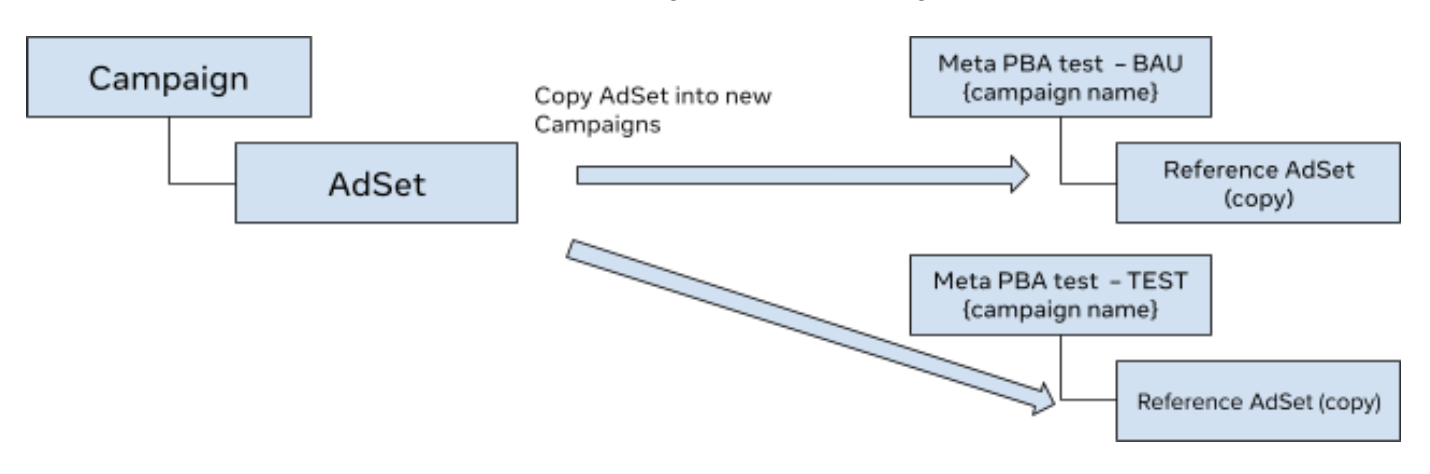
1. Control - Create a new Sales objective campaign and, within the new campaign, create a duplicate L2 (ad set) from the reference L2 (ad set). Name this "Meta PBA test - BAU {campaign name}".
2. Test - Repeat step 1 and name this "Meta PBA test - TEST {campaign name}"
3. Campaign and ad set need to satisfy the following eligibility criteria (for both Test and Control)
- Select Sales as your campaign objective, then click Continue.
- At the campaign level, select Campaign budget as your budget strategy, and Highest volume or Highest value as your Campaign bid strategy.
- Create and edit an ad set to configure these conversion settings:
- Conversion location: Select Website or Website + App
- Performance goal: Select Maximize number of conversions or Maximize value of conversions
- Dataset: select an eligible dataset
- Conversion event: Select Purchase
- Attribution model:
- Select Custom for Test
- Select Standard for BAU
- Select the custom attribution source (this should be "Rockerbox"):
- If using Web only, custom attribution source will be auto-populated
- If using both Web and App datasets, select the custom attribution source for each
- Save and stop for QA
Step 2: A/B Test Setup
Set up a split test using the Experiments tool. Advertiser is responsible for setting up the A/B test in Experiments by clicking 'Create an A/B test'. Meta help article for A/B test.
- Add campaigns to test and control cells
- Campaign A (Test): Name: "Meta PBA test - TEST {campaign name}"
- Campaign B (BAU): Name: "Meta PBA test - BAU {campaign name}"
- For more complex designs (e.g., 3-cell), add additional cells and campaigns as needed
- Set the schedule
- Start date: one day BEFORE the campaign start date
- End date: one day AFTER the campaign end date
- DISABLE 'End test early if a winner is found' to preserve statistical validity
- Test Name
- Name your study clearly (e.g., Custom Attribution vs BAU - Q3 2026)
- Determining the winner:
- Select 'Cost per purchase' as the key metric for winner declaration
- Advertisers may add metrics for additional business-specific KPIs
- Advertisers should use Rockerbox to determine campaign winner
Step 3: Launch
Things to monitor during the test flight:
Continue to monitor the following key metrics and reach out to Meta with any questions:
- Ensure CAPI integration & campaign quality for changes in Events Manager/Ads manager
- Ensure your match key coverage remains consistent before and during the test
Meta strongly recommends advertisers evaluate the performance of the Custom Attribution campaign against their BAU campaign in Rockerbox. This is due to 2 factors:
- Difference in attribution methodology. In Ads Manager, Custom Attribution results may show lower KPIs compared to Standard Attribution campaigns. This is because Custom Attribution reflects cross-publisher attribution, whereas Meta's standard reporting uses single-source attributed results.
- Data processing timing. There may be data processing delays/differences in attributed conversion data Meta receives from the external analytics tool.